LEGO® Brick Separator: What It Does and When to Use One
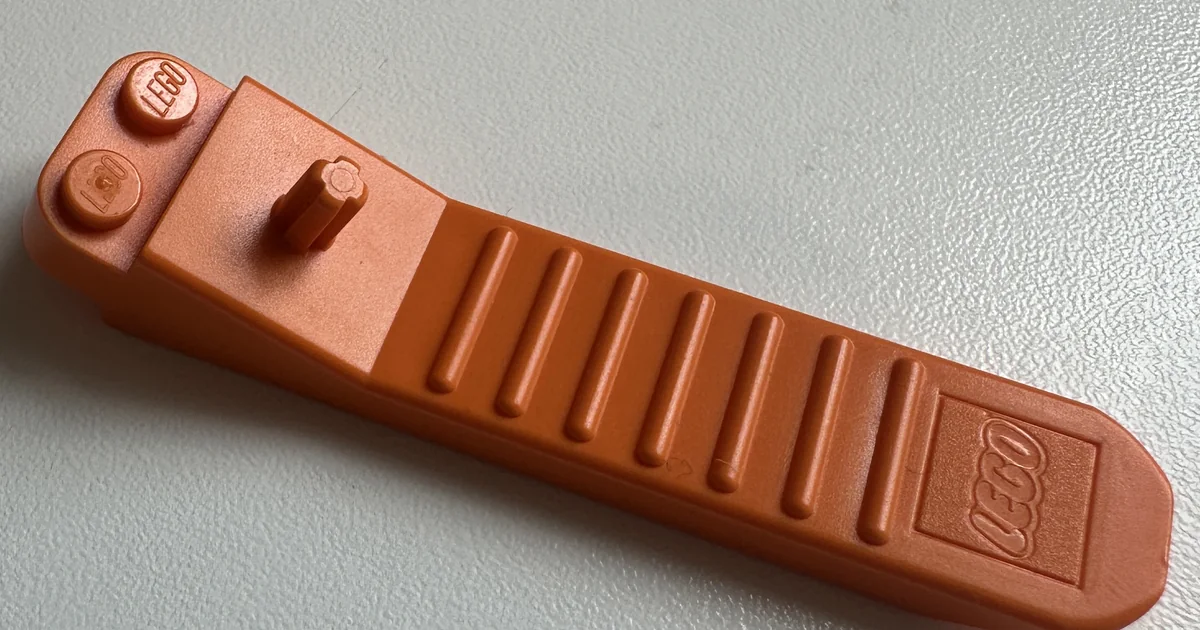
A LEGO® brick separator is a small plastic tool built to prise two bricks or plates apart without you gripping the piece itself. You need one mainly for plates and bricks that have clamped together hard, the kind that will not budge by hand no matter how you pull.
I tried sorting a mixed pile by hand once, instructions up for one set, hunting its pieces out of the box one at a time. Three pieces took ten to fifteen minutes. With dozens of sets' worth of brick in there, the arithmetic finishes the job for you before you have started.
That is really the whole case for a separator. It is cheap, it is small, and it exists for one specific, annoying moment in the hobby. It has nothing to do with sorting your pile or working out which set a piece belongs to, and I will get to that distinction, because people often expect more from it than it does.
What a brick separator actually does
It works as a lever, not a claw that pulls a brick straight off. The LEGO Group's own guidance for the tool describes both ends. The front has an angled part on the bottom: you slide that under the edge of a stuck plate and press down on the back, using the ridges for grip, and the angle levers the plate free. The top carries a small T-shaped segment, shaped like a tiny Technic beam, which you line up with a brick's cross hole to push a beam or axle out of the other side.
Both ends exist because the problem has two shapes. Two flat plates pressed together need levering apart from the side. A Technic beam or axle seized inside a brick needs pushing straight through, which is a different motion and a different part of the tool.
Doing it by hand works, until it does not. LEGO plastic clamps tightly by design, which is the whole point of the clutch that holds a model together. A model that has sat assembled for a long time tends to grip harder still. At that point your fingernails are doing a job they were never built for.
When you genuinely need one
A few situations come up again and again.
Old sets, long assembled. A model built years ago and left together clamps tighter than one freshly pressed. It is only ever a lever that saves you here, not your thumbnail.
Baseplates. Anything built directly onto a large baseplate, which is most of the point of a baseplate, is hard to lift without levering, because your fingers cannot get a grip on a brick surrounded by studs.
Buying a used lot. If you have bought a box of bricks still partly assembled into old models, which is common on secondhand marketplaces and on BrickLink, you will be pulling a lot of things apart before you ever get to sorting. Checking a used set is complete comes after this stage, not before it, because you cannot inventory what is still clamped into a wall.
Technic builds. Axles and pins can seize in their beams. The T-segment on the top of the separator is made for pushing an axle through rather than wrenching it, which is gentler on the piece than forcing it by hand.
What it will not help with is the actual rebuild. Once the bricks are apart, you still have a pile, and a pile does not sort itself. That is a different job, covered in how to sort loose LEGO bricks the fast way and rebuilding a set when the pieces are mixed up.
Official or third party
The LEGO Group makes an official brick separator, and third party versions exist too, usually a near identical wedge and hook shape, sold cheaply in multipacks.
For most people the difference is small. The shape has barely changed in decades because there is not much to improve on a wedge and a lever. If you want the safer default for Technic parts, where a snug fit against the axle matters more, it is reasonable to lean towards the official tool, though I have not had either one fail me on a plain brick.
What it will not fix
Here is the honest limit, and it is worth stating plainly because the tool gets credited with more than it does.
A brick separator gets bricks apart. It does not tell you what you are holding once they are apart, and it does not tell you which of your sets a piece belongs to. Those are two completely different problems. One is mechanical, the other is a knowledge problem, and no amount of levering solves the second.
This is exactly the gap I built Gybio to sit in. Once a pile is separated, you still have the job of working out which box each piece goes back into. Gybio sorts your loose bricks by colour, shape and size, shows which of your sets still need which pieces, and for the odd piece you cannot place, you photograph it and it tells you which set it belongs to, using set data from Rebrickable. How to identify a LEGO piece you can't place covers that part of the job in detail.
What Gybio will not do is lever the bricks apart for you. That part is still manual, still physical, and a separator is the right tool for it. Nobody is building a recognition app for that.
A cheaper fix for most situations
Before you buy anything, try this. Push your thumbnail gently under the edge of the stuck plate and rock it side to side rather than pulling straight up. If that will not shift it, use the edge of another flat LEGO plate as a makeshift lever instead of your nail: it slides under the same way the separator's angled front does, without the risk of marking the piece that a metal tool carries. Most plates come apart one of these two ways. It is only the deeply clamped ones, and anything built onto a full baseplate, where a proper separator earns its keep.
If you are regularly pulling apart old builds or buying secondhand lots, the tool pays for itself quickly. If you are opening one set and building it once, you probably will not need it at all.
What to do once everything is apart
Once the bricks are separated, the real work starts. If the pile came from more than one set, which is the usual reason anyone is reaching for a separator in the first place, what to do about missing pieces explains why most of what looks lost is actually just sitting in the wrong box. Gybio's full set of tools takes it from there: sorting, matching to your sets, and identifying the pieces that would otherwise sit at the bottom of the tub for years.
FAQ
What is a LEGO brick separator used for?
It prises apart plates, bricks and Technic pieces that have clamped together too tightly to pull apart by hand. The angled front levers a stuck plate free when you press down on the back, and the T-shaped segment on top pushes a Technic beam or axle out through a brick's cross hole.
Do I really need a brick separator?
Not always. Most freshly built models come apart by hand. You will want one for older sets that have sat assembled for a long time, for anything built onto a baseplate, and for Technic axles, which are better pushed through with the top of the tool than forced with your fingers.
Can I separate LEGO bricks without a tool?
Yes, for most ordinary builds. A fingernail slid gently under a plate's edge, then rocked side to side, gets most pieces apart. The edge of another LEGO plate works as a makeshift lever on the stubborn ones. A dedicated separator is really only worth it once those stop working.
Where can I buy a LEGO brick separator?
The LEGO Group makes its own, and listings for it come and go, so check its store for what is available where you are. Third party versions in the same wedge and lever shape are widely sold too, and work fine on plain bricks and plates.
Does a brick separator help with sorting or identifying LEGO pieces?
No. It only gets pieces physically apart. Sorting them back into their sets and identifying the ones you cannot place is a separate job, which is what Gybio is built for.
Gybio sorts your loose bricks against the sets you own and names the pieces you cannot place. Free for up to three sets and it runs in your browser, with no app store. Gybio Pro is £3.99 a month, or £39.99 a year, for unlimited sets.